promptlibretto studio
A browser-based registry editor for the promptlibretto library. Pick
sections, set runtime modes, hydrate prompts, generate against your own
local LLM, and export the whole setup as portable JSON.
Run it
Open http://localhost:8000. The studio renders one card per registry
section (personas, sentiment, examples, etc.), each with the same
controls.
Browser-direct LLM
The studio asks the server to hydrate prompts, then calls your own
local Ollama from the browser. The normal Studio Generate button does
not run Python-side output-policy validation or retries.
Configure the connection from the header chip — base URL, chat path,
shape (Ollama / OpenAI-compatible), and the model name. Settings live
in localStorage.
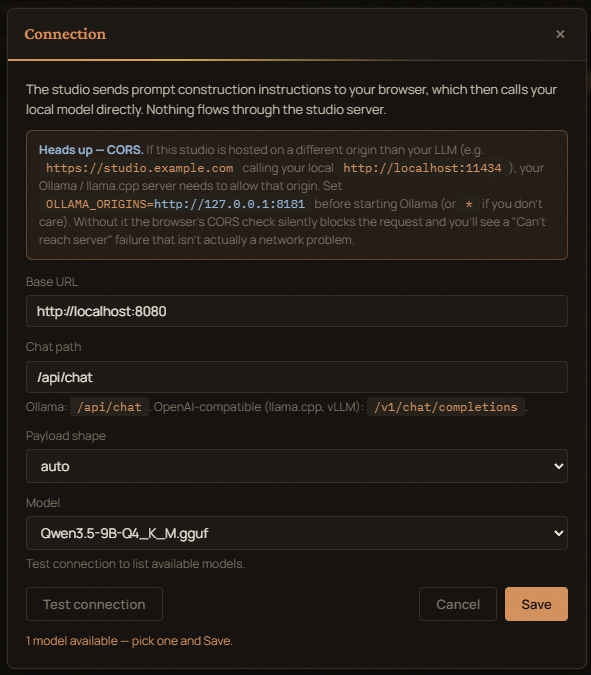
If you'd rather have the server make the LLM call (for headless tools, Notebooks, etc.), use the registry HTTP API below.
Builder (/builder)
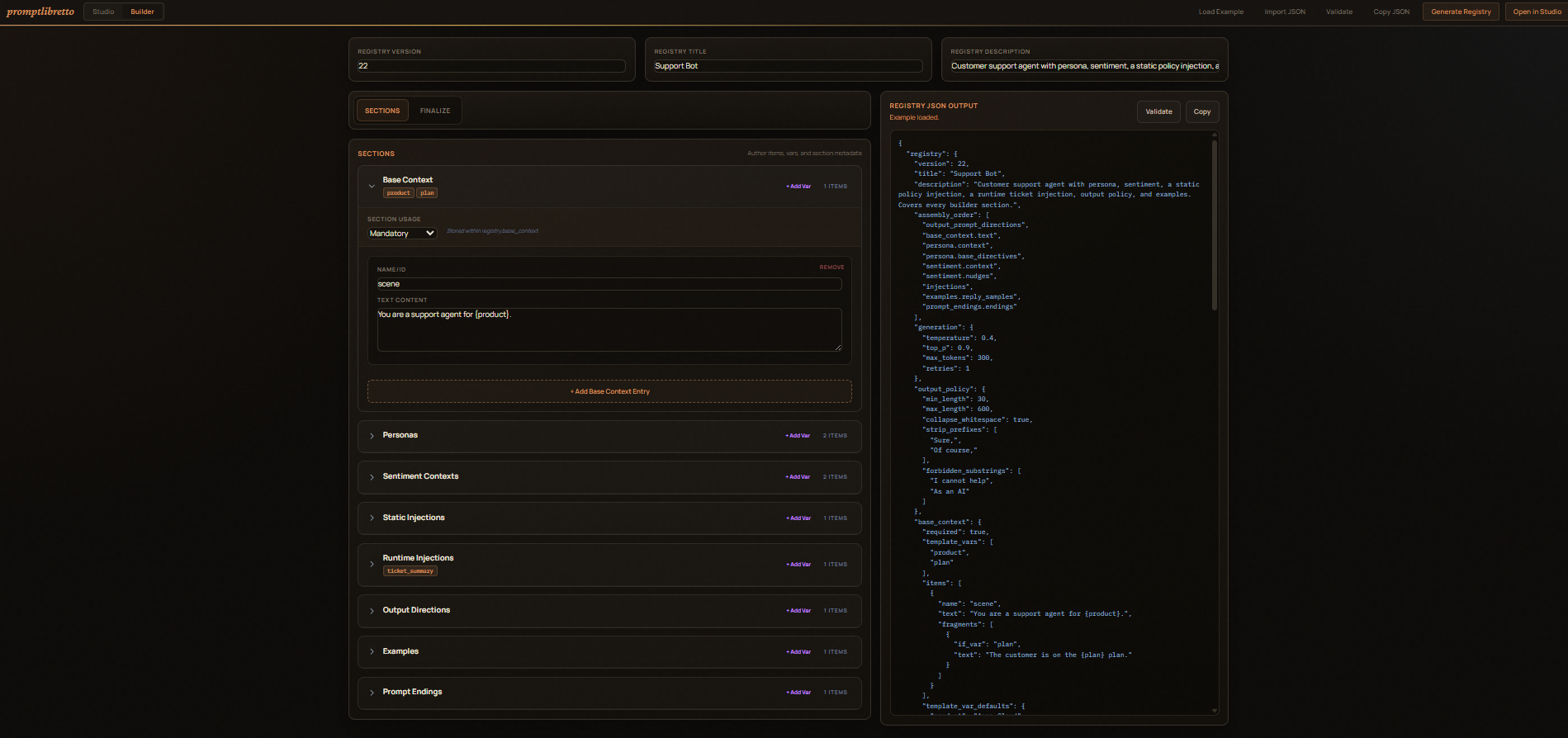
A visual form for constructing a registry from scratch without writing
JSON by hand. Navigate to /builder from the Studio header.
- Load Example — populates every section with a complete "Support Bot" example so you can see all fields in one place.
- Import JSON — paste an existing registry to load it into the form.
- Each section (Base Context, Personas, Sentiment, Static Injections, Runtime Injections, Output Directions, Examples, Prompt Endings) starts collapsed. Click a section header to expand it and use its Add button to create items. Fill in the fields; the JSON preview updates live.
- Pool items — most section item forms include an optional
items[]pool field. Filling it lets you reference the item as a named pool token (e.g.examples.my_pool) without needing a separate pool section. - Sentiment — Scale Settings — a collapsible block inside the Sentiment
section exposes
scale_template(the phrasing for thesentiment.scaletoken) and a per-itemscale_emotionoverride for each sentiment item. - Finalizer panel (right side) — two tabs:
- Registry JSON — live JSON output of the current registry.
- Example Prompt — renders a live text preview of the assembled prompt as you build, using your current assembly order and a sample selection from each section. Useful for sanity-checking the output shape without opening the Studio.
- Assembly Order — drag-and-drop the token sequence that controls how sections are woven together. The Named Pools palette auto-refreshes as you add or rename items.
- Generation / Policy tab — set temperature, top_p, max_tokens, output policy rules, etc.
- Validate — sends the current JSON to the server for a schema check.
- Generate Registry — downloads / copies the finished JSON.
- Open in Studio — pushes the registry directly to the Studio tab
via
localStorageso you can start tuning immediately.
The two tabs
Compose
The primary surface. For each section:
- Selection control —
<select>for required sections, checkboxes for optional ones. - Random toggle — Pick a random item at run time. Re-rolls on
every Pre-generate / Generate. Disabled for
base_context. - Sentiment slider (sentiment only) — drives the
sentiment.scaletoken. Has its own Random at run time checkbox. - Inline editor — pre-filled with the selected item's values; edits
write back through to the in-memory registry. To add or remove items,
use the Builder (
/builder). - Template vars — labeled inputs for each declared variable. The
+ varbutton on each section adds a new{var}placeholder; the×next to a var removes it.
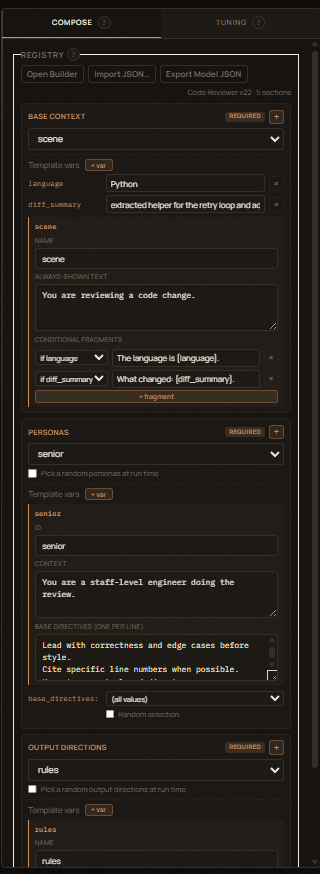
The Compose tab also has the Registry strip at the top:
- Import JSON… — paste a registry to load.
- Export Model JSON — copies the canonical registry, with all your
current selections, modes, sliders, and generation overrides baked
in. Drop it into your app and
load_registry()it back. - Hydrate → User Input — pre-fills the engine's input field with the assembled prompt. Useful if you have an external integration watching that field.
Tuning
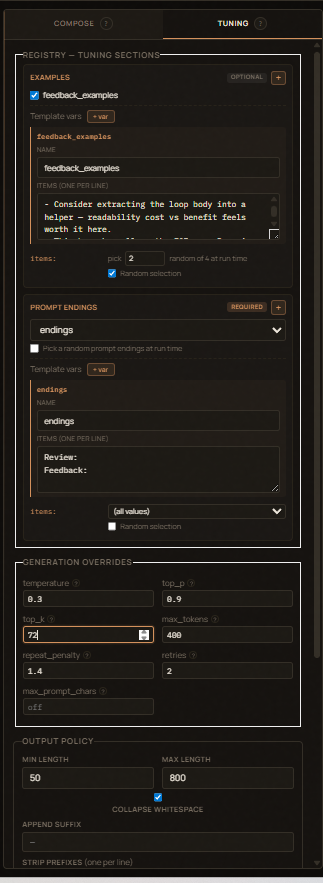
- Generation Overrides — temperature, top_p, top_k, max_tokens,
repeat_penalty, retries, max_prompt_chars. Hover any field name for a
tooltip explaining what it does. Empty fields fall through to library
defaults. Browser-direct generation uses the sampling fields;
retriesis used byEngine.run()and/api/registry/generate.max_prompt_charsis currently stored/exported but not enforced by the engine. - The
examples,prompt_endings, and injection sections also live here (as opposed to Compose) since they're "tuning" choices rather than primary content.
Output panel
Two sub-tabs:
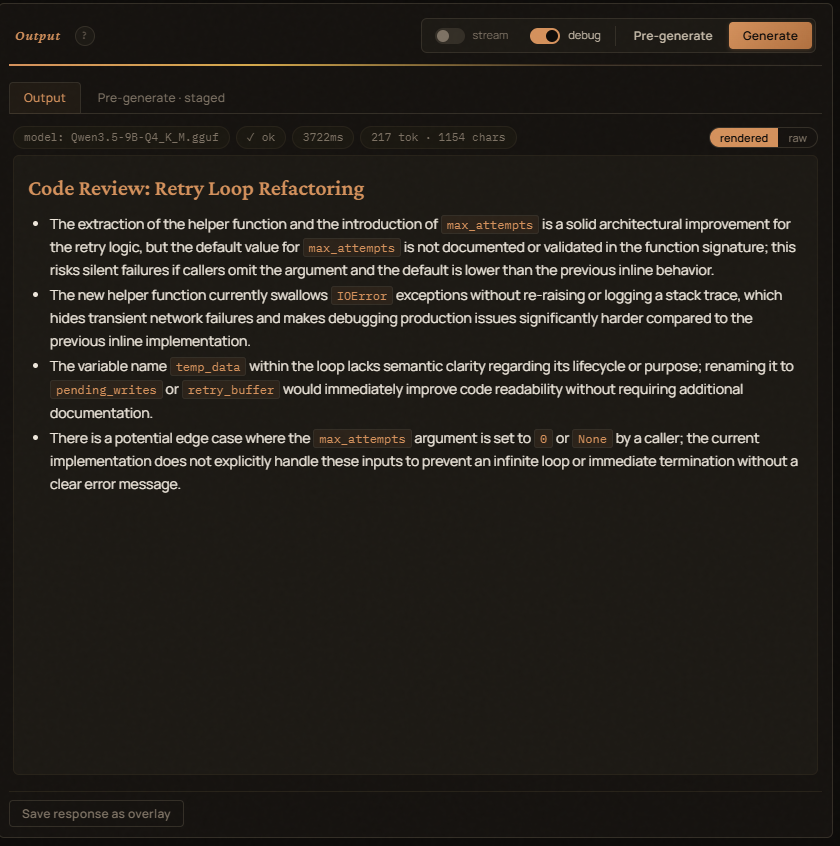
- Output — the generated text (rendered or raw view).
- Pre-generate — the assembled prompt, exactly as it'll be sent. Pre-generate before Generate to inspect.
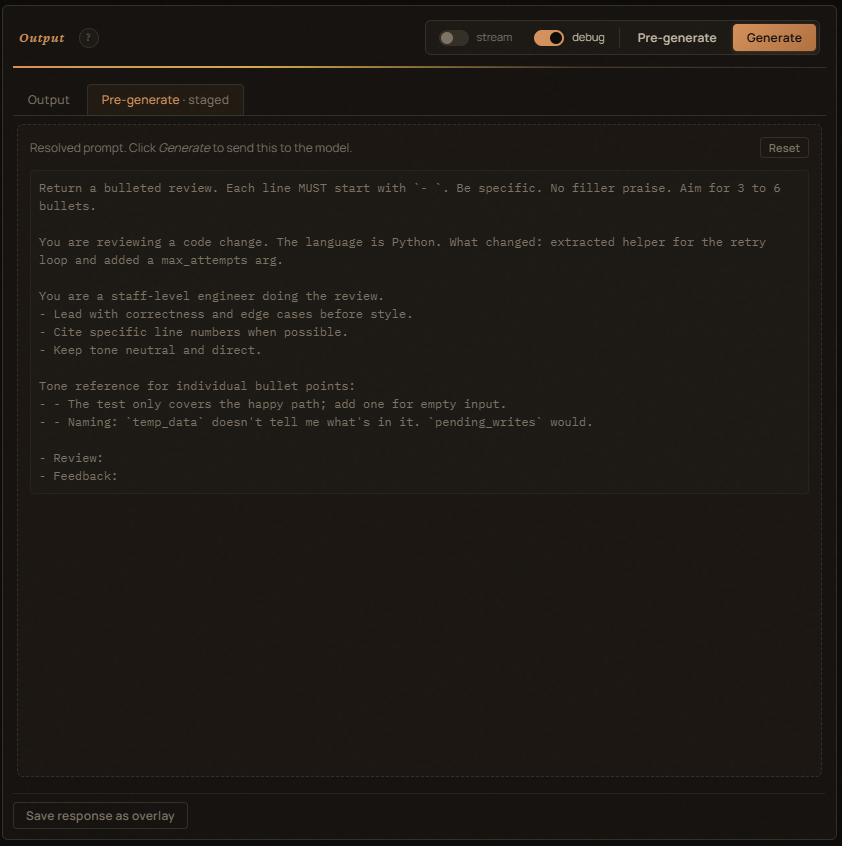
Above the Output text:
model: <name>— the LLM the request will go to.✓ ok/✗ empty/✗ error— accepted indicator after a run.<n>ms— total round-trip.<n> tok · <n> chars— completion tokens (when the provider returns them) and the response char count.
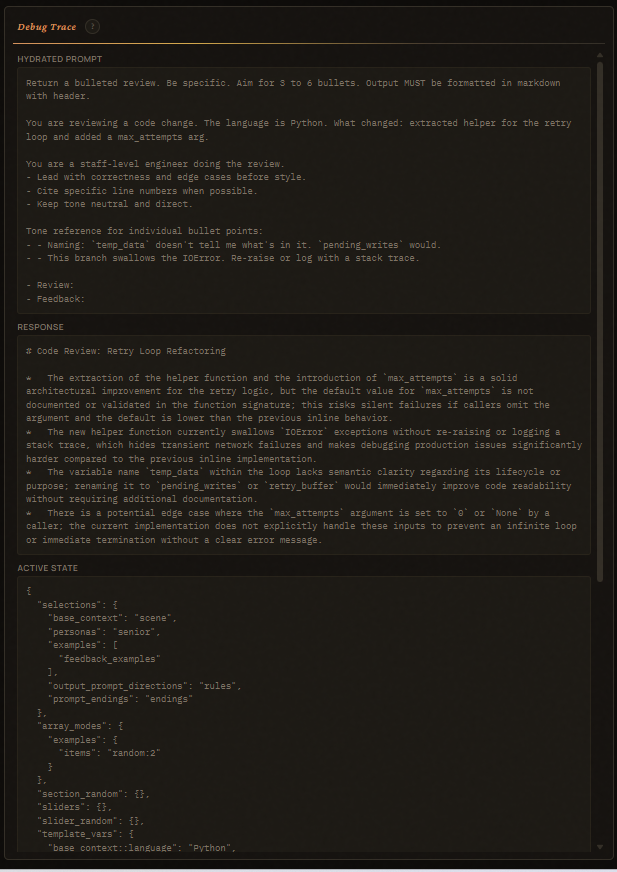
Debug Trace
Far-right pane. Filled fresh on every Generate:
- Hydrated Prompt — the exact string sent to the LLM.
- Response — what came back.
- Active State — JSON snapshot of selections / array_modes /
section_random / sliders / template_vars at click time. Drop it into
Engine.run(state=...)to reproduce. - Usage & Timing — total ms + provider-reported usage.
- Resolved Config — base URL, chat path, model, shape, generation overrides.
Snapshots
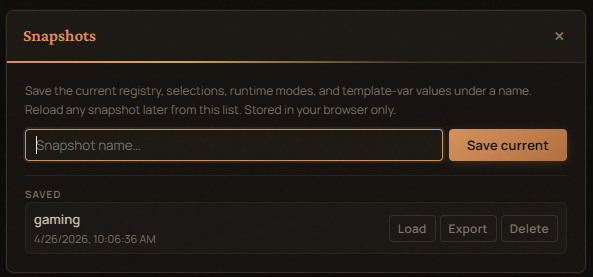
The header Snapshots button opens a modal:
- Save the current panel state (registry + selections + modes + slider
- template-vars + generation overrides) under a name.
- Load any saved snapshot back. Restoring rebuilds the panels and re-applies your selections.
- Delete or Export any snapshot to JSON.
Storage is localStorage (pl-registry-snapshots-v1). Snapshots
persist across reloads but stay on the device.
Registry HTTP API
The studio also mounts these endpoints for headless use:
| Endpoint | Purpose |
|---|---|
POST /api/registry/load |
Parse + canonicalize a registry JSON. |
POST /api/registry/hydrate |
Build the prompt for a given registry + state. |
POST /api/registry/generate |
Hydrate + LLM + Python output policy. Returns text + usage. |
GET /health |
Liveness check. |
Request body for hydrate / generate:
{
  "registry": { "registry": { ... } },
  "state": {
    "selections": {...},
    "array_modes": {...},
    "section_random": {...},
    "sliders": {...},
    "slider_random": {...},
    "template_vars": {...}
  },
  "route": "optional-route-name",
  "seed": 42
}
Server-side generation uses OllamaProvider by default. Set
PROMPT_ENGINE_MOCK=1 to use MockProvider instead, or
OLLAMA_URL / OLLAMA_CHAT_PATH to point at a different host.
Docker
The container exposes port 8000 and runs the studio with browser-direct
LLM by default. There's no server-side state — snapshots live in the
user's browser. Override env vars in docker-compose.yml to enable
mock-mode or a server-side Ollama target.
CLI
--host defaults to 127.0.0.1 (or $HOST); --port defaults to
8000 (or $PORT).
Server-side environment variables
These only affect the optional /api/registry/generate endpoint. The
studio's main flow (the browser calling Ollama directly) ignores them.
| Variable | Default | Effect |
|---|---|---|
PROMPT_ENGINE_MOCK |
0 |
1 / true / yes — server uses MockProvider. |
OLLAMA_URL |
http://localhost:11434 |
Base URL the server-side OllamaProvider hits. |
OLLAMA_CHAT_PATH |
/api/chat |
Endpoint path. Auto-detects payload shape from /v1/. |
HOST |
127.0.0.1 |
Studio bind host (overridden by --host). |
PORT |
8000 |
Studio bind port (overridden by --port). |
Editing fragments
base_context items support conditional fragments — short pieces
of text gated by a template variable. Add them in the inline editor's
Conditional fragments row:
| if | text |
|---|---|
| (always) | You're watching a streamer. |
location |
Currently at {location}. |
sublocation |
Specifically: {sublocation}. |
A fragment with if location only renders when the location
template-var has a value at runtime. So an unfilled {sublocation}
doesn't leave a broken sentence in the output.